
AI UX Halloween Weekend Project.
AI UX Halloween Weekend Project.
Chores Bubbles.
Chores Bubbles.
A design and prototyping journey by Nataliia Yarko, blending AI, UX, and family life.
A design and prototyping journey by Nataliia Yarko, blending AI, UX, and family life.
For parents, and anyone who juggles invisible tasks at home.
For parents, and anyone who juggles invisible tasks at home.
The Spark
Flu vaccination. Two-month deadline. I said "later." Then I forgot.
That's when it hit me: the problem isn't what's urgent. It's what doesn't have a clear deadline—and lives in your head.
Flu vaccination. Two-month deadline. I said "later." Then I forgot.
That's when it hit me: the problem isn't what's urgent. It's what doesn't have a clear deadline—and lives in your head.
Flu vaccination. Two-month deadline. I said "later." Then I forgot.
That's when it hit me: the problem isn't what's urgent. It's what doesn't have a clear deadline—and lives in your head.
I'm a product designer. A mum. A wife. I hold every task in my head until it slips through my fingers: renew insurance, update passwords, book dentist, organise curtains, learn that thing I mentioned, call my friend back. They're not chores. They're not emergencies. They're just... things. Everywhere. Forever.
I'm a product designer. A mum. A wife. I hold every task in my head until it slips through my fingers: renew insurance, update passwords, book dentist, organise curtains, learn that thing I mentioned, call my friend back. They're not chores. They're not emergencies. They're just... things. Everywhere. Forever.
I'm a product designer. A mum. A wife. I hold every task in my head until it slips through my fingers: renew insurance, update passwords, book dentist, organise curtains, learn that thing I mentioned, call my friend back. They're not chores. They're not emergencies. They're just... things. Everywhere. Forever.
I tried existing apps. Todoist, Trello, Jira. But they all felt like work—schedules, columns, pressure. The last thing a stressed parent needs is another productivity system that makes you feel behind.
I tried existing apps. Todoist, Trello, Jira. But they all felt like work—schedules, columns, pressure. The last thing a stressed parent needs is another productivity system that makes you feel behind.
I tried existing apps. Todoist, Trello, Jira. But they all felt like work—schedules, columns, pressure. The last thing a stressed parent needs is another productivity system that makes you feel behind.
I wanted something different. Something that doesn't feel like nagging—for me or my 13-year-old.
So I built something different.
I wanted something different. Something that doesn't feel like nagging—for me or my 13-year-old.
So I built something different.
I wanted something different. Something that doesn't feel like nagging—for me or my 13-year-old.
So I built something different.
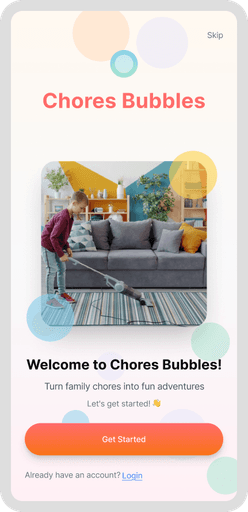
Chores Bubbles is for any task that doesn't have a clear deadline but lives in your mind. Household chores. Personal projects. Things you said you'd do "someday." It doesn't feel like work. No schedules. No guilt. Just bubbles that grow when something's coming up soon. A place where anyone can step up. A way to stop carrying everything alone.
This is for everyone holding a thousand invisible tasks. For anyone who wants to stop forgetting what matters
Chores Bubbles is for any task that doesn't have a clear deadline but lives in your mind. Household chores. Personal projects. Things you said you'd do "someday." It doesn't feel like work. No schedules. No guilt. Just bubbles that grow when something's coming up soon. A place where anyone can step up. A way to stop carrying everything alone.
This is for everyone holding a thousand invisible tasks. For anyone who wants to stop forgetting what matters
Chores Bubbles is for any task that doesn't have a clear deadline but lives in your mind. Household chores. Personal projects. Things you said you'd do "someday." It doesn't feel like work. No schedules. No guilt. Just bubbles that grow when something's coming up soon. A place where anyone can step up. A way to stop carrying everything alone.
This is for everyone holding a thousand invisible tasks. For anyone who wants to stop forgetting what matters

How Chores Bubbles Works
The Bubble System
The Bubble System
The Bubble System
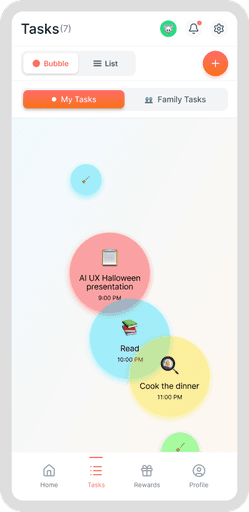
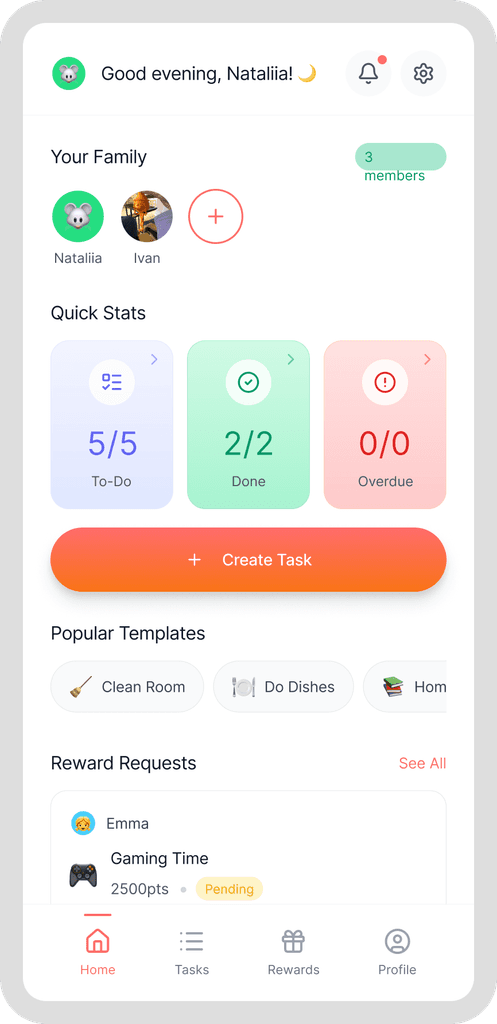
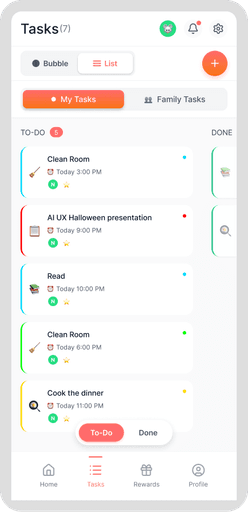
Instead of lists, schedules, or columns, Chores Bubbles uses floating bubbles to visualise your mental load.
Size = Urgency
The closer something is to its deadline, the bigger the bubble grows.
Huge bubble 🟢 ← Due in less than 24 hours (coming NOW)
Large bubble 🟢 ← Due in 1-3 days (soon)
Medium bubble 🟢 ← Due in 3-7 days (coming up)
Tiny bubble 🟢 ← Due in 7+ days or no deadline (can wait)
No pressure. No red boxes screaming at you. Just visual: this is getting close.
Color = Priority
Each bubble is coloured by how important it is:
🔴 Red = Highest priority (can't miss this)
🟠 Orange = High priority (should do soon)
🟡 Yellow = Medium priority (important but flexible)
🟢 Green = Low priority (nice to do)
You see everything at once. Your whole mental load. Organic. Floating. Not overwhelming—just real.
Labels on Bubbless
Instead of lists, schedules, or columns, Chores Bubbles uses floating bubbles to visualise your mental load.
Size = Urgency
The closer something is to its deadline, the bigger the bubble grows.
Huge bubble 🟢 ← Due in less than 24 hours (coming NOW)
Large bubble 🟢 ← Due in 1-3 days (soon)
Medium bubble 🟢 ← Due in 3-7 days (coming up)
Tiny bubble 🟢 ← Due in 7+ days or no deadline (can wait)
No pressure. No red boxes screaming at you. Just visual: this is getting close.
Color = Priority
Each bubble is coloured by how important it is:
🔴 Red = Highest priority (can't miss this)
🟠 Orange = High priority (should do soon)
🟡 Yellow = Medium priority (important but flexible)
🟢 Green = Low priority (nice to do)
You see everything at once. Your whole mental load. Organic. Floating. Not overwhelming—just real.
Labels on Bubbless
Instead of lists, schedules, or columns, Chores Bubbles uses floating bubbles to visualise your mental load.
Size = Urgency
The closer something is to its deadline, the bigger the bubble grows.
Huge bubble 🟢 ← Due in less than 24 hours (coming NOW)
Large bubble 🟢 ← Due in 1-3 days (soon)
Medium bubble 🟢 ← Due in 3-7 days (coming up)
Tiny bubble 🟢 ← Due in 7+ days or no deadline (can wait)
No pressure. No red boxes screaming at you. Just visual: this is getting close.
Color = Priority
Each bubble is coloured by how important it is:
🔴 Red = Highest priority (can't miss this)
🟠 Orange = High priority (should do soon)
🟡 Yellow = Medium priority (important but flexible)
🟢 Green = Low priority (nice to do)
You see everything at once. Your whole mental load. Organic. Floating. Not overwhelming—just real.
Labels on Bubbless
How It Actually Works
How It Actually Works
How It Actually Works
For the Person Managing
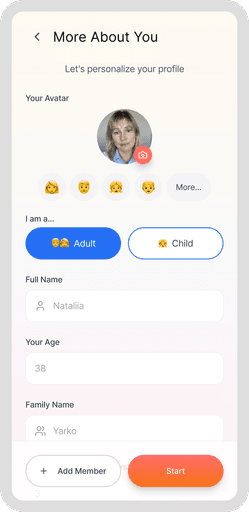
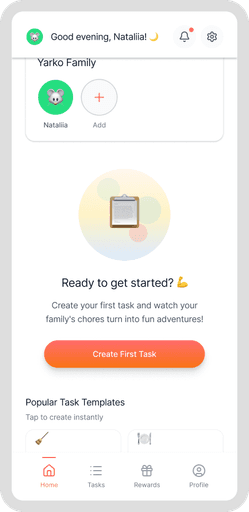
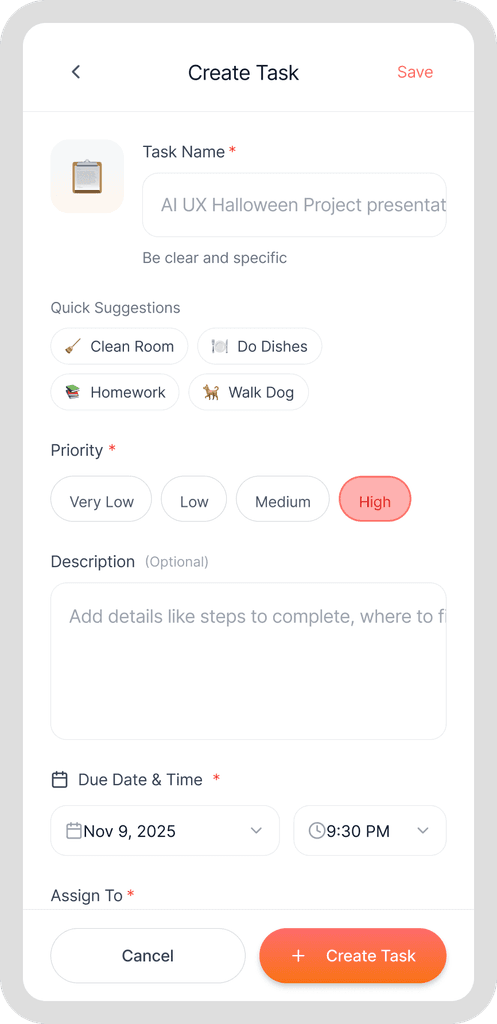
Add a task - title, description, when it's due
Set the priority - Red, Orange, Yellow, or Green
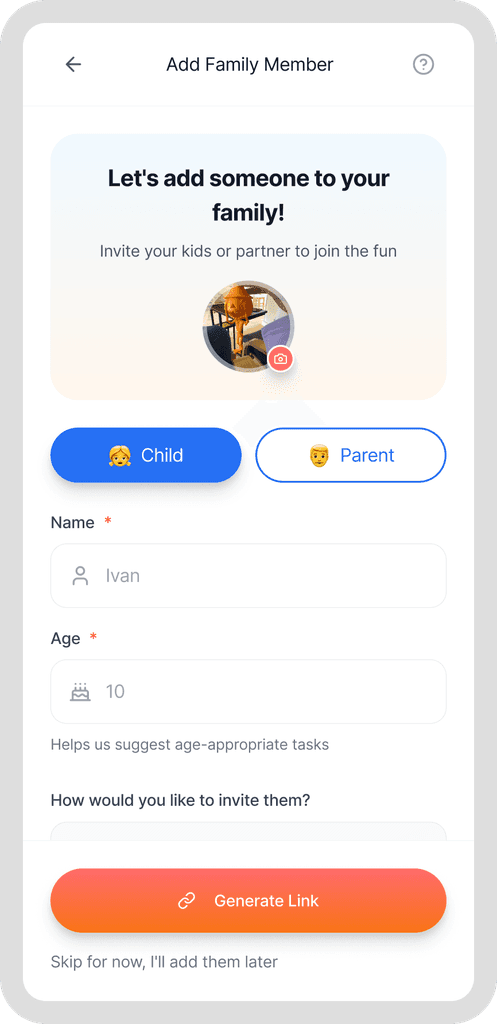
Assign to someone (or keep it for yourself)
Add photo proof (optional) - so everyone knows what "done" looks like
Set points (optional) - reward for completion
For the Person Doing
See your tasks - bubbles on your screen
Tap a task - see what it actually needs
Do the thing
Submit proof (photo or checkbox) - show it's really done
Wait for approval - parent reviews and approves
For Everyone
When a task is approved → You get points 🏆
For the Person Managing
Add a task - title, description, when it's due
Set the priority - Red, Orange, Yellow, or Green
Assign to someone (or keep it for yourself)
Add photo proof (optional) - so everyone knows what "done" looks like
Set points (optional) - reward for completion
For the Person Doing
See your tasks - bubbles on your screen
Tap a task - see what it actually needs
Do the thing
Submit proof (photo or checkbox) - show it's really done
Wait for approval - parent reviews and approves
For Everyone
When a task is approved → You get points 🏆
For the Person Managing
Add a task - title, description, when it's due
Set the priority - Red, Orange, Yellow, or Green
Assign to someone (or keep it for yourself)
Add photo proof (optional) - so everyone knows what "done" looks like
Set points (optional) - reward for completion
For the Person Doing
See your tasks - bubbles on your screen
Tap a task - see what it actually needs
Do the thing
Submit proof (photo or checkbox) - show it's really done
Wait for approval - parent reviews and approves
For Everyone
When a task is approved → You get points 🏆
The Rewards System
The Rewards System
The Rewards System
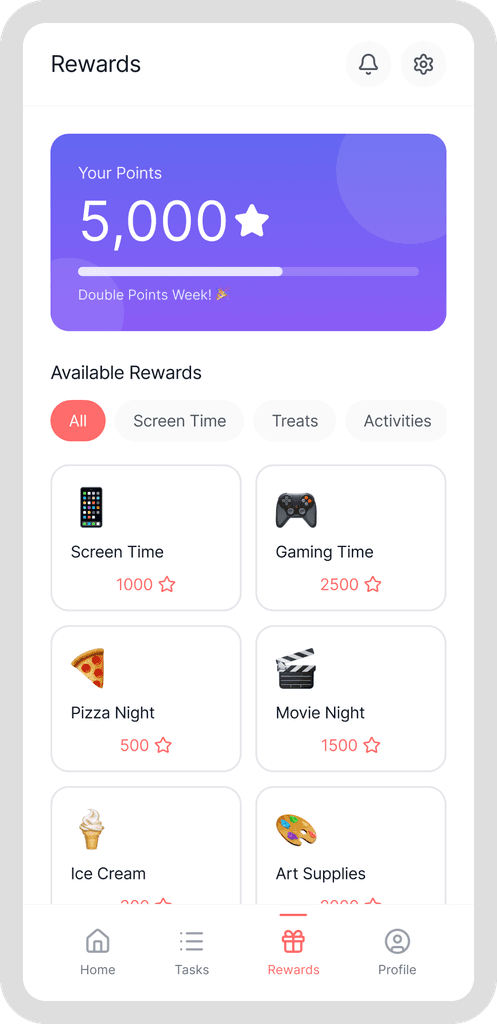
Points aren't just numbers. They're real things you actually want.
Examples of rewards:
💻 30 minutes of extra screen time = 50 points 💰 £5 pocket money = 100 points 🍦 Ice cream trip = 75 points 🎮 New game level unlock = 80 points ⏰ Stay up 1 hour later = 60 points
How it works:
Parent sets up the "reward store" (what things cost in points)
Child earns points by doing tasks
Child can redeem points for rewards they actually want
Parent approves the redemption
Everyone wins—task done, kid motivated, parent less stressed
Points aren't just numbers. They're real things you actually want.
Examples of rewards:
💻 30 minutes of extra screen time = 50 points 💰 £5 pocket money = 100 points 🍦 Ice cream trip = 75 points 🎮 New game level unlock = 80 points ⏰ Stay up 1 hour later = 60 points
How it works:
Parent sets up the "reward store" (what things cost in points)
Child earns points by doing tasks
Child can redeem points for rewards they actually want
Parent approves the redemption
Everyone wins—task done, kid motivated, parent less stressed
Points aren't just numbers. They're real things you actually want.
Examples of rewards:
💻 30 minutes of extra screen time = 50 points 💰 £5 pocket money = 100 points 🍦 Ice cream trip = 75 points 🎮 New game level unlock = 80 points ⏰ Stay up 1 hour later = 60 points
How it works:
Parent sets up the "reward store" (what things cost in points)
Child earns points by doing tasks
Child can redeem points for rewards they actually want
Parent approves the redemption
Everyone wins—task done, kid motivated, parent less stressed
The Rewards System
The Rewards System
The Rewards System
Points aren't just numbers. They're real things you actually want.
Examples of rewards:
💻 30 minutes of extra screen time = 50 points 💰 £5 pocket money = 100 points 🍦 Ice cream trip = 75 points 🎮 New game level unlock = 80 points ⏰ Stay up 1 hour later = 60 points
How it works:
Parent sets up the "reward store" (what things cost in points)
Child earns points by doing tasks
Child can redeem points for rewards they actually want
Parent approves the redemption
Everyone wins—task done, kid motivated, parent less stressed
Points aren't just numbers. They're real things you actually want.
Examples of rewards:
💻 30 minutes of extra screen time = 50 points 💰 £5 pocket money = 100 points 🍦 Ice cream trip = 75 points 🎮 New game level unlock = 80 points ⏰ Stay up 1 hour later = 60 points
How it works:
Parent sets up the "reward store" (what things cost in points)
Child earns points by doing tasks
Child can redeem points for rewards they actually want
Parent approves the redemption
Everyone wins—task done, kid motivated, parent less stressed
Points aren't just numbers. They're real things you actually want.
Examples of rewards:
💻 30 minutes of extra screen time = 50 points 💰 £5 pocket money = 100 points 🍦 Ice cream trip = 75 points 🎮 New game level unlock = 80 points ⏰ Stay up 1 hour later = 60 points
How it works:
Parent sets up the "reward store" (what things cost in points)
Child earns points by doing tasks
Child can redeem points for rewards they actually want
Parent approves the redemption
Everyone wins—task done, kid motivated, parent less stressed
🔵 How I built it
Not alone. With Claude and Figma Make.
Not alone. With Claude and Figma Make.
Not alone. With Claude and Figma Make.
Step 1:
Talk it out: I described the problem. Claude and I debated. What should the flow actually be?bout features. We refined.
Step 1:
Talk it out: I described the problem. Claude and I debated. What should the flow actually be?bout features. We refined.
Step 1:
Talk it out: I described the problem. Claude and I debated. What should the flow actually be?bout features. We refined.
Step 2:
Sketch it: Turned conversations into wireframes.
Step 2:
Sketch it: Turned conversations into wireframes.
Step 2:
Sketch it: Turned conversations into wireframes.
Step 3:
VIBE code it: Claude wrote vibe code. Figma Make turned it into a working prototype.
Step 3:
VIBE code it: Claude wrote vibe code. Figma Make turned it into a working prototype.
Step 3:
VIBE code it: Claude wrote vibe code. Figma Make turned it into a working prototype.
Step 4:
Fix what they did: I fixed a lot what Claude wrote and what Figma make created.
Step 4:
Fix what they did: I fixed a lot what Claude wrote and what Figma make created.
Step 4:
Fix what they did: I fixed a lot what Claude wrote and what Figma make created.
The secret: I treated Claude like a teammate, not a tool. We iterated. We argued about features. We refined.
The secret: I treated Claude like a teammate, not a tool. We iterated. We argued about features. We refined.
The secret: I treated Claude like a teammate, not a tool. We iterated. We argued about features. We refined.
🟢 What Went WRONG (& how i FIXED it)
🟢 What Went WRONG (& how i FIXED it)
Claude was too verbose.
Claude was too verbose.
Long responses. Mid-project style shifts. Inconsistent components. Frustrating.
Long responses. Mid-project style shifts. Inconsistent components. Frustrating.
Solution: I asked Claude to write out the style guide. Then I gave it a constraint prompt.
Solution: I asked Claude to write out the style guide. Then I gave it a constraint prompt.
Suddenly: focused, consistent, short.
Suddenly: focused, consistent, short.
Big lesson: You have to teach AI how to communicate with you.
Big lesson: You have to teach AI how to communicate with you.
✨ What I learned
✨ What I learned
1. AI can be amazing and terrible at the same time It needs active management. You're not off the hook.
1. AI can be amazing and terrible at the same time It needs active management. You're not off the hook.
1. AI can be amazing and terrible at the same time It needs active management. You're not off the hook.
2. Ask for shorter responses Context dumps help once. Then you need quick, actionable feedback.
2. Ask for shorter responses Context dumps help once. Then you need quick, actionable feedback.
2. Ask for shorter responses Context dumps help once. Then you need quick, actionable feedback.
3. This is bigger than chores I thought it was just for families. Claude and I realised it works for anyone carrying tasks without clear deadlines: roommates, single people, teams. That changed everything.
3. This is bigger than chores I thought it was just for families. Claude and I realised it works for anyone carrying tasks without clear deadlines: roommates, single people, teams. That changed everything.
3. This is bigger than chores I thought it was just for families. Claude and I realised it works for anyone carrying tasks without clear deadlines: roommates, single people, teams. That changed everything.
4. Rules are freedom Clear constraints (style guides, limitations) made everything faster.
4. Rules are freedom Clear constraints (style guides, limitations) made everything faster.
4. Rules are freedom Clear constraints (style guides, limitations) made everything faster.
🔗 Try it / Learn more
(hope will be tomorrow)
(hope will be tomorrow)